How to Use LBank Pay for Crypto Payments
Supports USDT QR code payments with real-time settlement in local fiat currency.
Last Updated Time: 2026-10-09
LBank Pay is a convenient cryptocurrency payment service launched by LBank, designed to provide users with a faster, more secure, and more seamless payment experience. With the LBank App, users can quickly complete payments and use their digital assets across more everyday spending scenarios.
What you need before getting started
Download LBank App
Search for the "LBank" app in the App Store or Google Play to download the official application.
Complete KYC Verification
Complete KYC to unlock higher limits and full features.
Deposit USDT to your Spending Account
Ensure you have sufficient USDT balance.
Complete KYC in advance to enjoy higher payment limits and full access to all features.
Operating Steps
LBank Pay supports two payment scenarios: Fixed Amount (merchant specifies the payment amount, scan to confirm) and Flexible Amount (manually enter the amount after scanning). The following uses Brazil's PIX as an example.
Step 1: Scan the merchant's QR code
Before you begin: Make sure you're signed in to the LBank app, have a sufficient USDT balance, and have granted camera access.
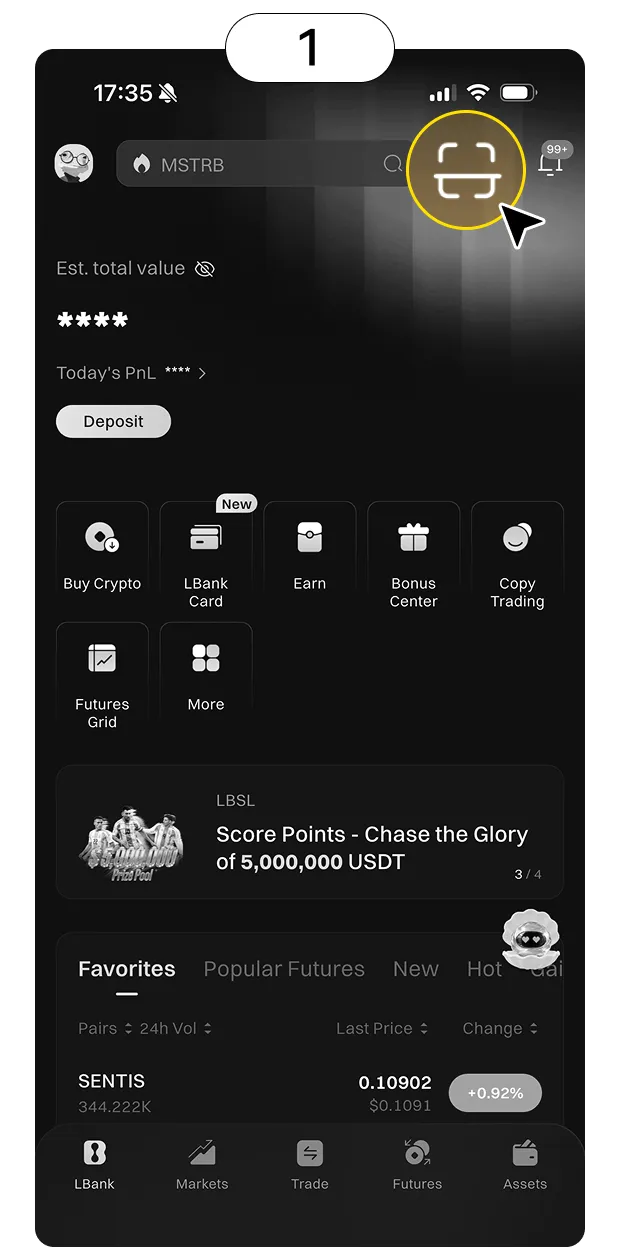
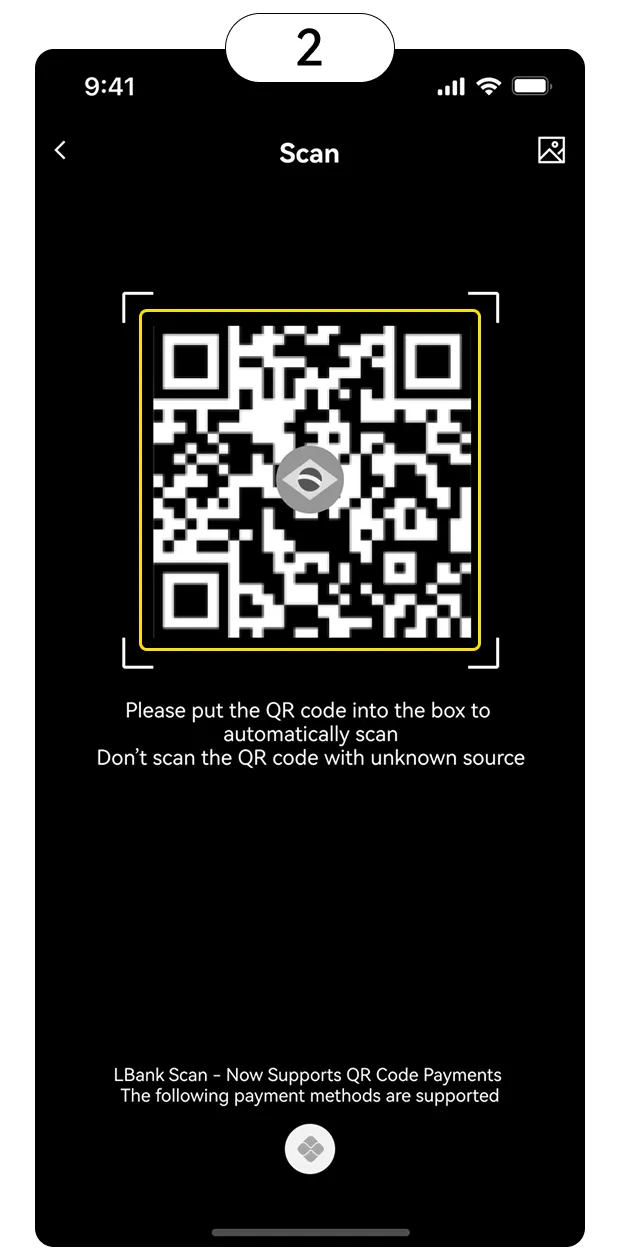
Tap "Scan" at the top right of the LBank homepage and scan the merchant's PIX QR code. The system will automatically parse it:
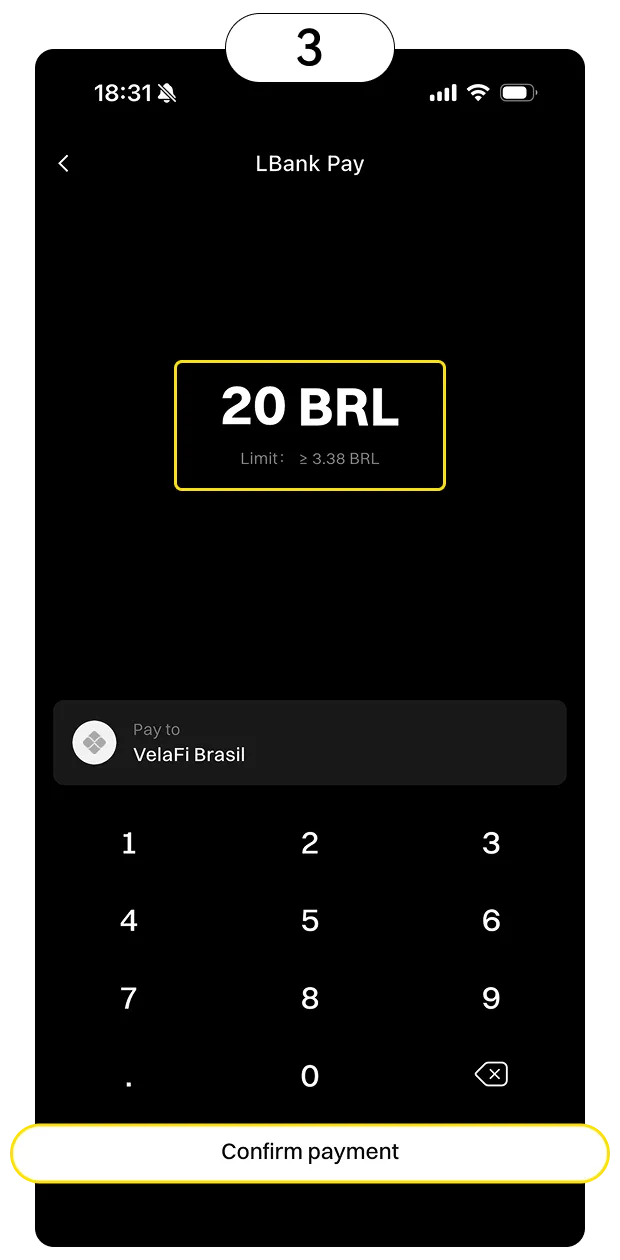
- 1QR Code with Amount: After scanning, the page displays the amount payable (e.g., 500 BRL).
- 2Flexible Amount QR Code: Scan to enter the payment page where the amount field is blank. Please manually enter the payment amount (e.g., 300 BRL).
Only scan QR codes from trusted merchants
Step 2: Confirm Order and Complete Payment
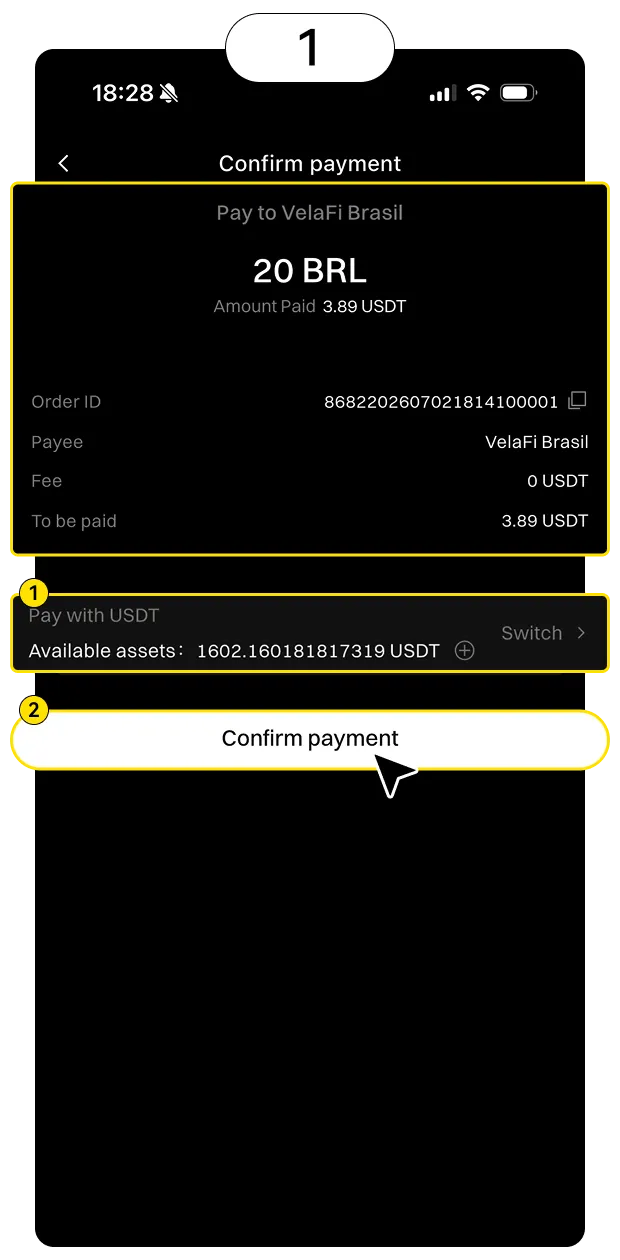
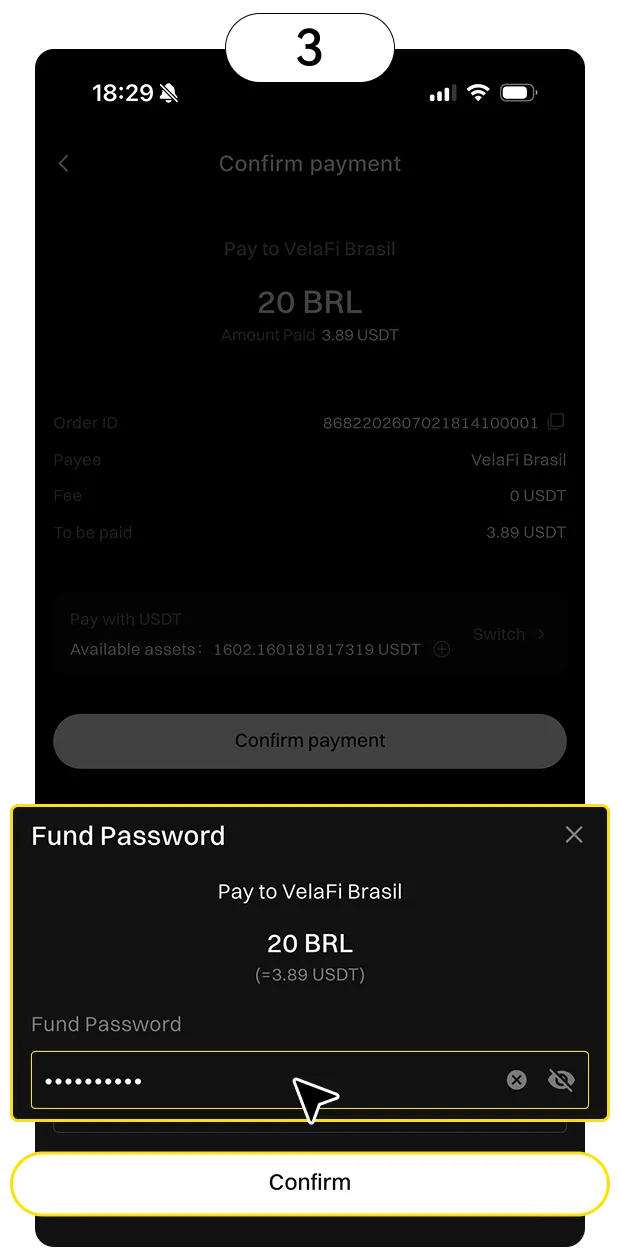
Verify Information: Order ID, Recipient Name, Payment Amount (USDT), Transaction Fee.
- 1Click "Confirm Payment"
- 2Enter your "Asset Password"
- 3The page displays "Payment Successful"
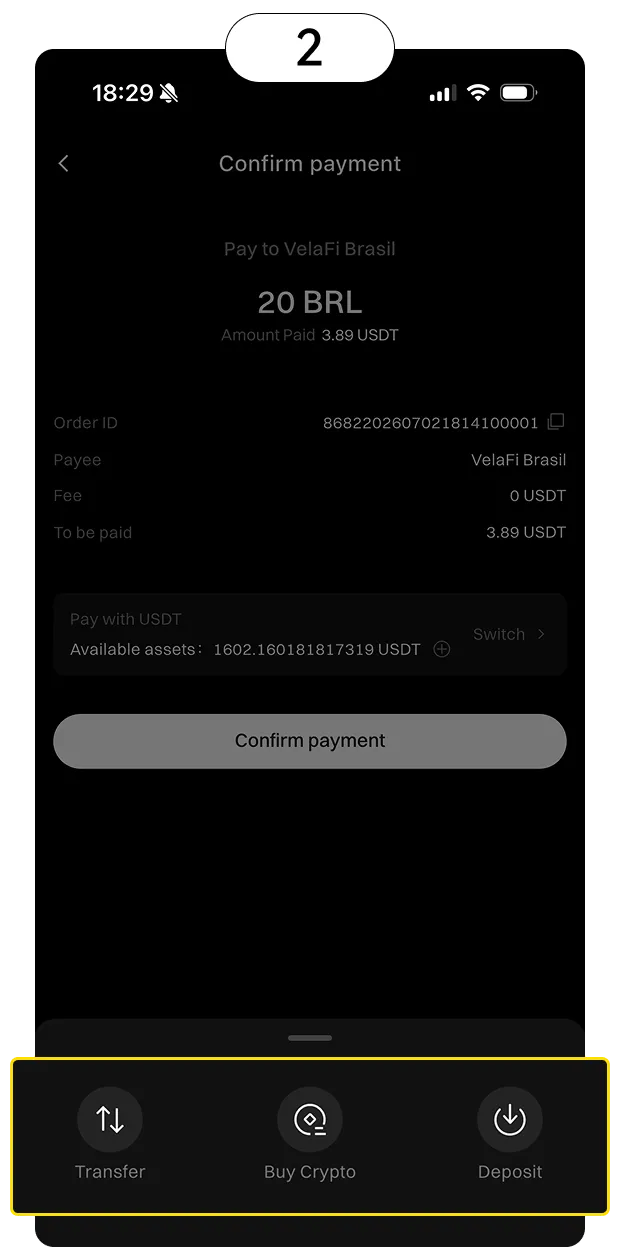
If balance is insufficient: The "Deposit" button will be displayed; click to go to the deposit page.
Please double-check the amount carefully before confirming; payments are irreversible once completed.
Step 3: View Records and Receipts
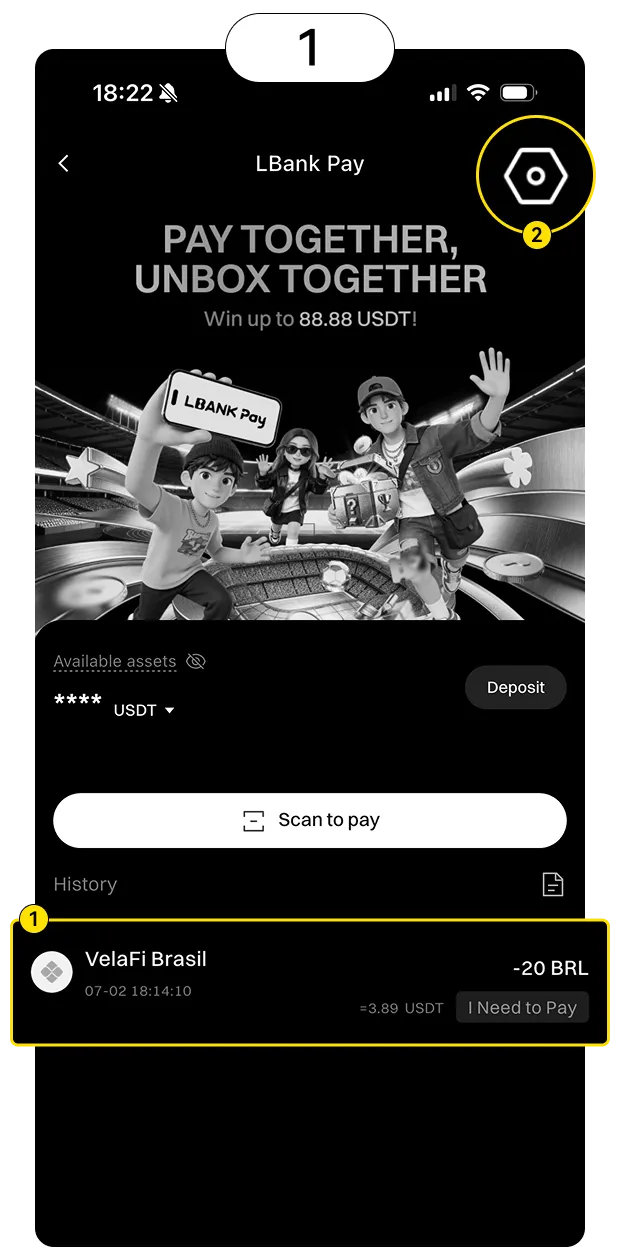
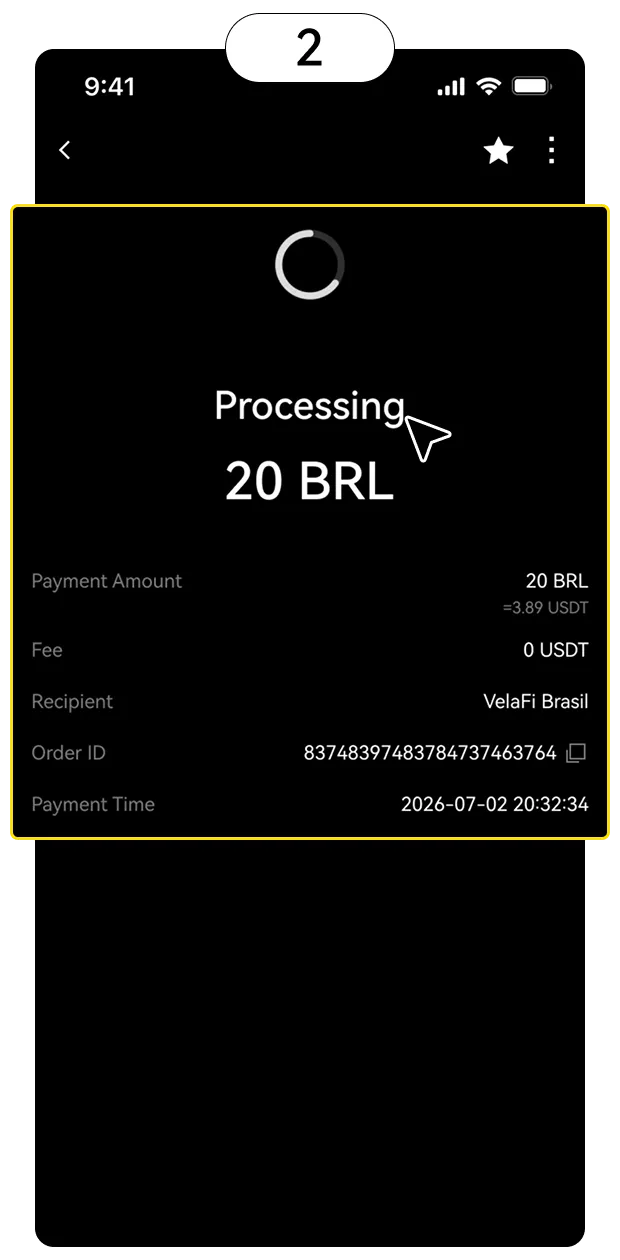
Navigation: Tap "History" at the bottom to view the order history. Order details include: payment amount, transaction fees, recipient, order ID, payment time, and status.
- 1"Scan to Pay" button: Return to the Scan to Pay page
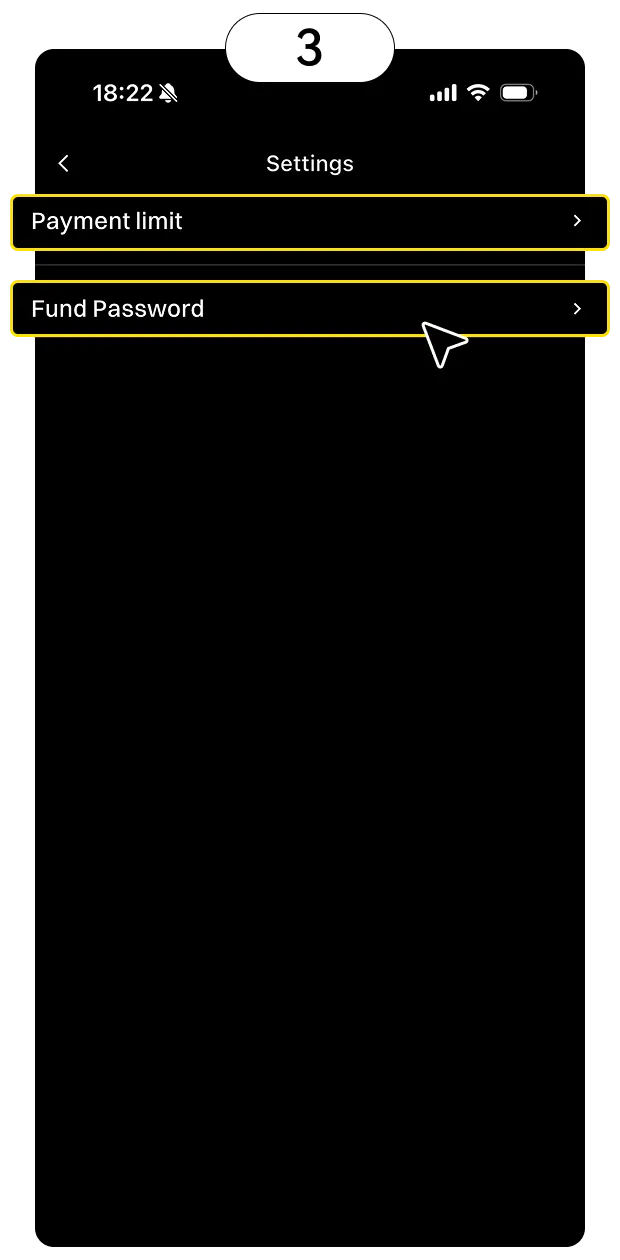
- 2"Settings" entry: Adjust the spending limit and fund password
It is recommended to take a screenshot as proof after a successful payment.
Payment Limits
Country/Region | Payment Method | User status | Minimum per Transaction (USDT) | Maximum per Transaction (USDT) | Daily Limit (USDT) | Monthly Limit (USDT) |
|---|---|---|---|---|---|---|
Vietnam (VND) | VietQR/Momo | KYC | 0.40 | 5000 | 10000 | 50000 |
Vietnam (VND) | VietQR/Momo | Non-KYC | 0.65 | 200 | 500 | 5000 |
Brazil (BRL) | PIX | KYC | 0.65 | 900 | 1500 | 50000 |
Brazil (BRL) | PIX | Non-KYC | 0.65 | 200 | 500 | 5000 |
Philippines (PHP) | PHQR | KYC | 0.05 | 500 | 5000 | 50000 |
Philippines (PHP) | PHQR | Non-KYC | 0.05 | 200 | 200 | 200 |
Singapore (SGD) | Paynow QR | KYC | 1 | 500 | 5000 | 50000 |
Singapore (SGD) | Paynow QR | Non-KYC | 1 | 200 | 200 | 200 |
Thailand (THB) | Prompt Pay | KYC | 0.05 | 500 | 5000 | 50000 |
Thailand (THB) | Prompt Pay | Non-KYC | 0.05 | 200 | 200 | 200 |
Laos (LAK) | LAO QR | KYC | 0.10 | 500 | 5000 | 50000 |
Laos (LAK) | LAO QR | Non-KYC | 0.10 | 200 | 200 | 200 |
Cambodia (KHR) | ACLEDA Bank | KYC | 0.05 | 500 | 5000 | 50000 |
Cambodia (KHR) | ACLEDA Bank | Non-KYC | 0.05 | 200 | 200 | 200 |
Mongolia (MNT) | Mongolia QR | KYC | 0.50 | 500 | 5000 | 50000 |
Mongolia (MNT) | Mongolia QR | Non-KYC | 0.50 | 200 | 200 | 200 |
Argentina (ARS) | Mercado Pago | KYC | 1 | 900 | 1500 | 50000 |
Argentina (ARS) | Mercado Pago | Non-KYC | 1 | 200 | 500 | 5000 |
Malaysia (MYR) | Duitnow QR | KYC | 0.50 | 500 | 5000 | 50000 |
Malaysia (MYR) | Duitnow QR | Non-KYC | 0.50 | 200 | 200 | 200 |
Indonesia (IDR) | QRIS | KYC | 0.50 | 500 | 5000 | 50000 |
Indonesia (IDR) | QRIS | Non-KYC | 0.50 | 200 | 200 | 200 |
Actual limits are subject to the real-time information displayed in the app and may change due to regulatory requirements. Complete KYC verification to enjoy higher limits.
Notice
Fees: Banks or third-party payment providers may charge additional fees. LBank Pay settles transactions at the real-time exchange rate with no hidden fees.
Compliance Notice (Vietnam Region): Fiat settlement is provided through licensed payment institutions. Digital assets are not recognized as a means of payment in Vietnam.
Security Tips: Only scan QR codes from trusted merchants. Avoid making payments over public Wi-Fi, and enable two-factor authentication (2FA) for better security.
Limit Exceeded: To increase your limit, you must upgrade your KYC verification. LBank reserves the right to adjust or restrict services based on risk control requirements.
Payment Failure Handling: If your payment fails, you can retry within 30 minutes. If your balance is insufficient, the system will prompt you to top up your account.
Customer Support: If you encounter any issues, please contact
Risk Warning: Digital asset prices are highly volatile. The use of digital assets for illegal activities, including gambling or circumventing foreign exchange regulations, is strictly prohibited.