


 Transférer
To help you stay informed about account security, asset changes, trading progress, and market movements, the LBank App offers flexible notification settings. You can customize which alerts to receive based on your preferences, ensuring you never miss important updates while avoiding unnecessary notifications. This guide will walk you through how to configure message notifications on the LBank App.
Access Message Settings
-
Open the LBank App and tap the gear icon next to your profile avatar on the homepage.
-
On the「Preference」page, tap「Message Settings」.
-
You will see six notification categories, each of which can be turned on or off individually:
-
System Notifications: Account security, risk, maintenance, delisting, and service updates
-
Asset Updates: Deposit, withdrawal, Earn, and other asset updates
-
Trading Notifications: Order, position, and risk updates across spot, futures, fiat, copy trading, and grid
-
Promotions & Rewards: Latest promotions, exclusive offers, and activity updates
-
New Listings: Upcoming spot and futures asset/trading pair listings
-
Market Alerts: Price alerts and market movement updates
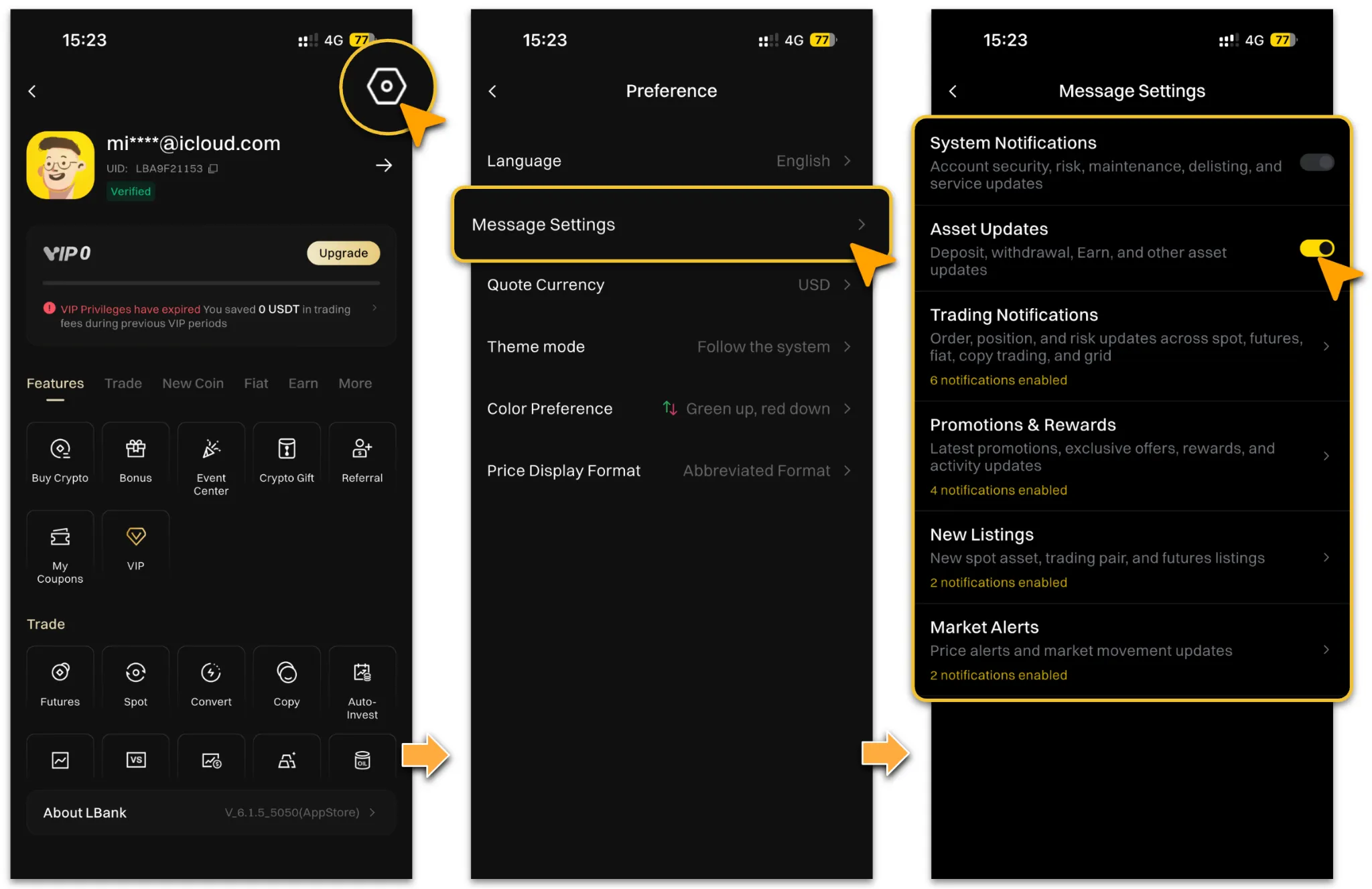
Notification Category Settings
The following section explains how to configure each item within the four categories:「Trading Notifications」,「Promotions & Rewards」,「New Listings」, and「Market Alerts」— so you can enable or disable them according to your needs.
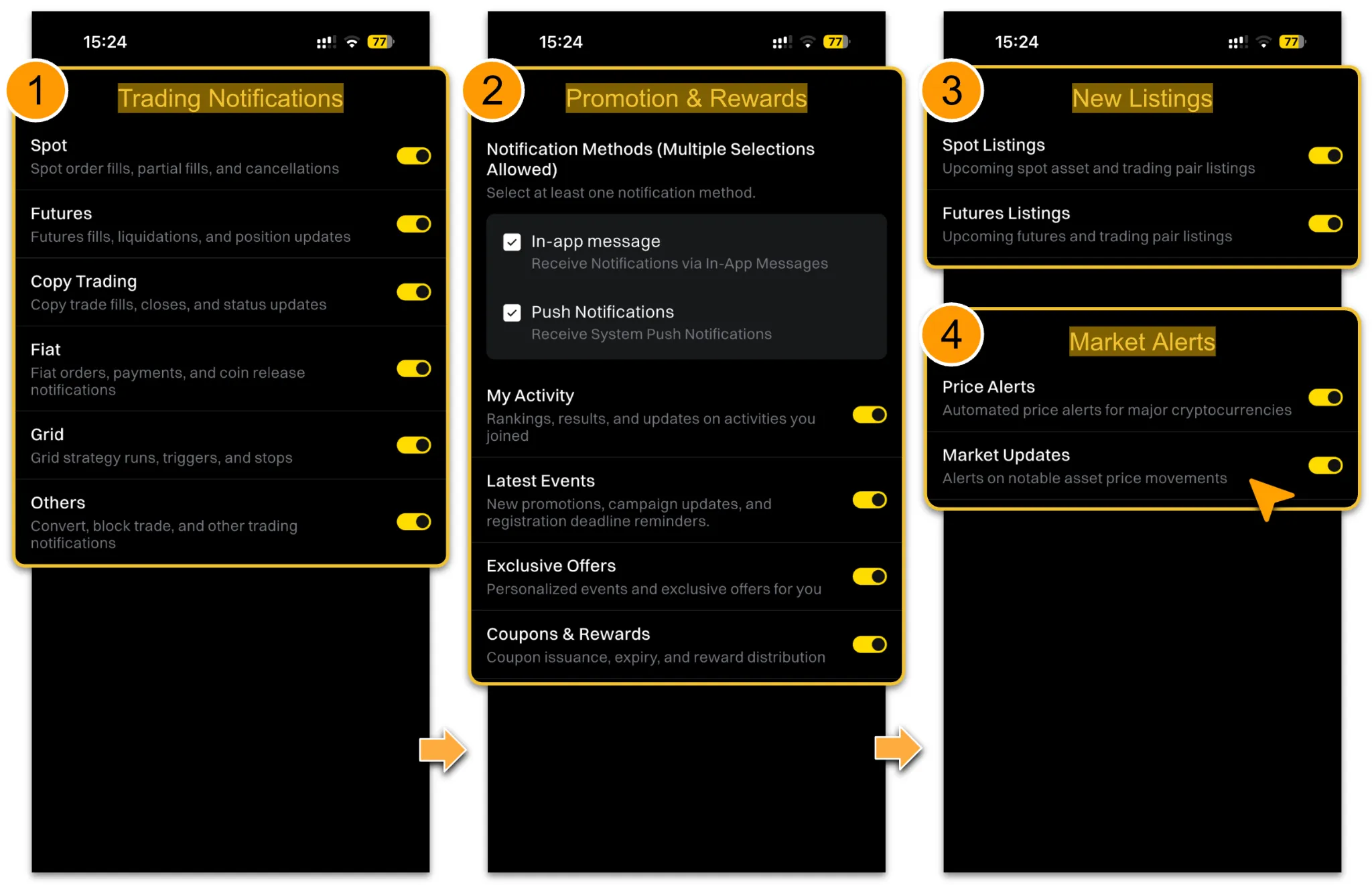
Trading Notifications
-
Tap「Trading Notifications」to set preferences for each trading type:
-
Spot: Spot order fills, partial fills, and cancellations
-
Futures: Futures fills, liquidations, and position updates
-
Copy Trading: Copy trade fills, closes, and status updates
-
Fiat: Fiat orders, payments, and coin release notifications
-
Grid: Grid strategy runs, triggers, and stops
-
Others: Convert, block trade, and other trading notifications
-
Enable the toggles based on your trading habits.
Promotions & Rewards
-
Tap「Promotions & Rewards」, then select your preferred notification method(s) — at least one method must be selected:
-
In-App Message: Receive notifications via In-App Messages
-
Push Notifications: Receive system push notifications
-
You can then configure the following items individually:
-
My Activity: Rankings, results, and updates on activities you joined
-
Latest Events: New promotions, campaign updates, and registration deadline reminders
-
Exclusive Offers: Personalized events and exclusive offers for you
-
Coupons & Rewards: Coupon issuance, expiry, and reward distribution
New Listings
-
Tap「New Listings」to enable the following:
-
Spot Listings: Upcoming spot asset and trading pair listings
-
Futures Listings: Upcoming futures asset and trading pair listings
Market Alerts
-
Tap「Market Alerts」to enable the following:
-
Price Alerts: Automated price alerts for major cryptocurrencies
-
Market Updates: Alerts on notable asset price movements
Reminder
-
Each notification category can be toggled independently. We recommend configuring them based on your trading habits and areas of interest to stay informed of important updates.
-
Disabling a notification category may cause you to miss important alerts (such as asset changes or trading status updates). Please adjust settings with care.
-
「System Notifications」relate to account security — we recommend keeping this category enabled to receive timely security alerts.