TensorSpace (TPU)

How to Buy TensorSpace (TPU) on LBank

Learn how to buy TensorSpace (TPU) on LBank, including payment methods such as credit cards, debit cards, Apple Pay, and bank transfers, as well as the purchase process, preparations, and FAQs.

Step 1
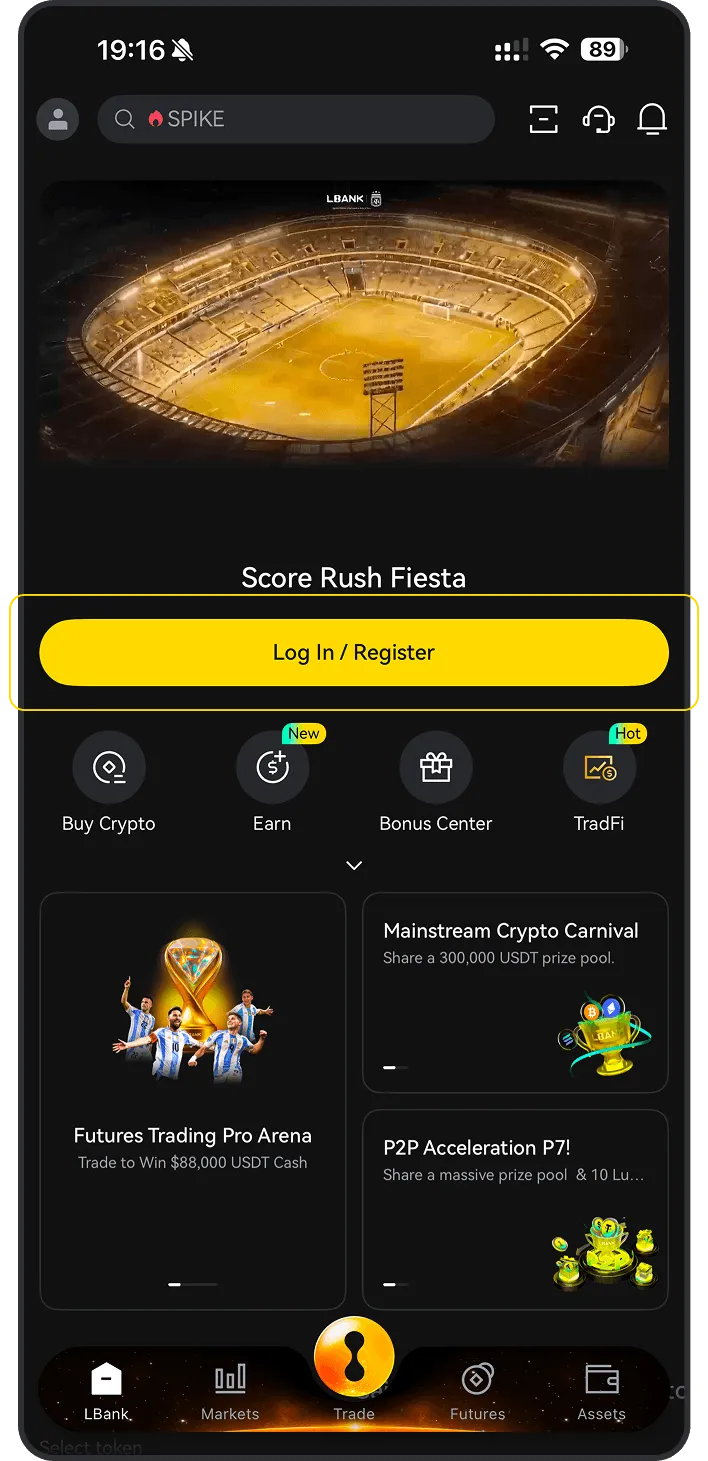
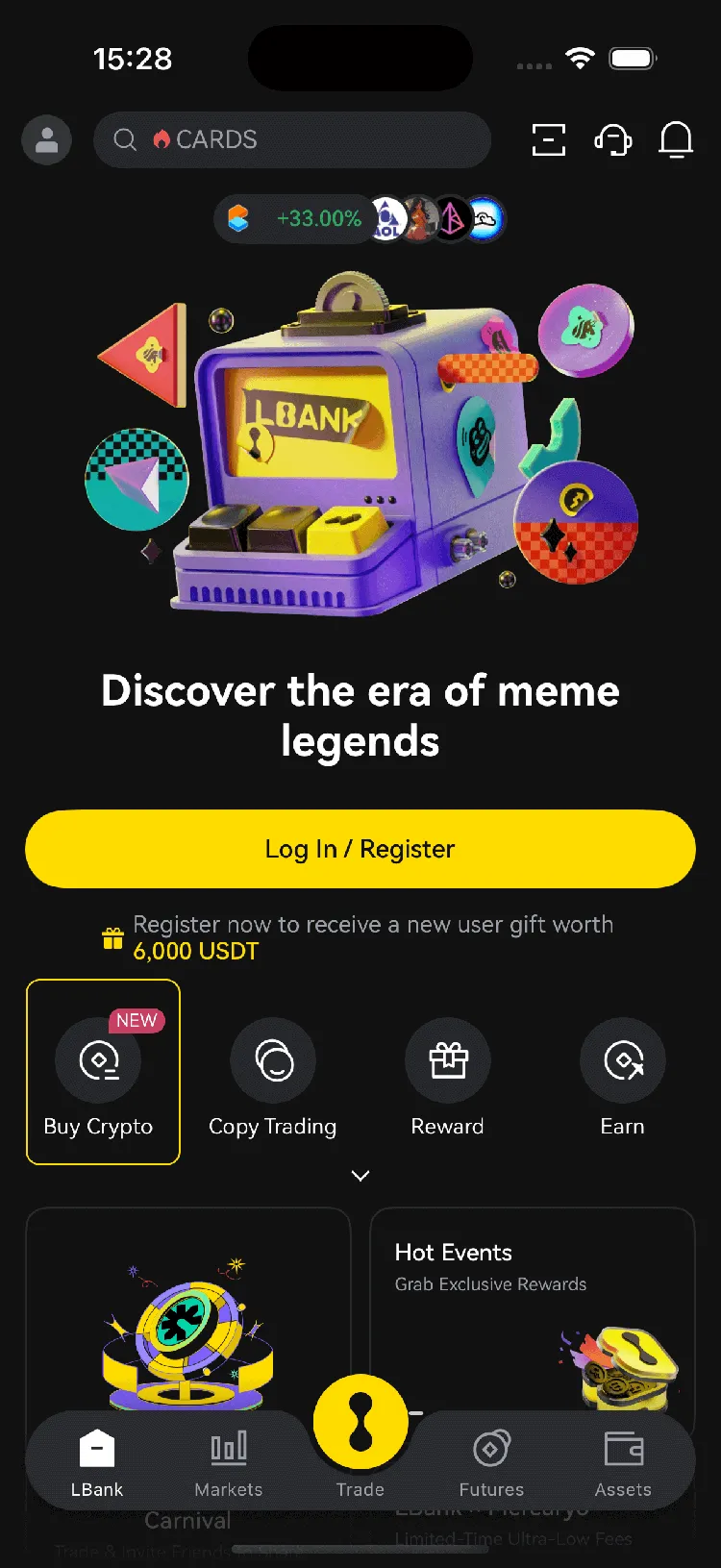
Download the LBank App
Please download the LBank App and register to get started
Step 2
Fund your account
Deposit using your preferred payment method.
Step 3
Choose your cryptocurrency
Select the crypto you want to buy from over 3,000,000 cryptocurrencies available on LBank Exchange or Wallet.

Purchase Decision Overview

Credit / Debit Card

Credit / Debit Card

Fee
Variable Fees
Processing Time
Usually within 1 minute, up to 48 hours
Minimum Purchase Amount
Starting from approx. 10–15 USD
Supported Regions
Subject to region, fiat currency, issuing bank, and payment channel support
Bank Transfer / Local Transfer

Bank Transfer / Local Transfer

Fee
Variable Fees
Processing Time
Depends on the payment method; some local channels may be faster
Minimum Purchase Amount
Starting from approx. 1–10 USD
Supported Regions
Subject to local payment channel support

Three Simple Steps to Buy TPU on LBank

Register an LBank account

How to Buy TPU on LBank: Payment Methods Overview

Explore the available payment methods for buying TPU on LBank, including credit card, debit card, bank transfer, Apple Pay, Google Pay, PayPal, and P2P, to quickly choose the most suitable way to buy TPU.

Credit / Debit Card
Credit / Debit Card
Processing Time: Usually within 1 minute; up to 48 hours
Use a Visa/Mastercard that supports international online transactions and ensure 3D Secure is enabled; if it fails, try a different card or try again later
Common Reasons for Failure: The issuing bank declined the cryptocurrency transaction; insufficient balance; 3D Secure verification failed; risk control interception; or region/card network not supported
Bank Transfer / Local Transfer
Processing Time: Instant or 1–3 Business Days
Verify the receiving account, reference code, and transfer network, and use a bank account consistent with your identity verification
Common Reasons for Failure: Incorrect receiving information or reference code; name mismatch; bank processing delay; or unsupported transfer network

What Do You Need to Prepare Before Buying TensorSpace (TPU) on LBank?

Check the preparations required before buying TensorSpace (TPU) on LBank, including account registration, identity verification (KYC), payment methods, regional availability, and pre-purchase precautions to help you smoothly complete the BTC purchase process.

Suitable for
Users who want to quickly buy TPU with fiat
Before You Buy: Checklist
Register and log in to your account
Complete required KYC
Prepare payment method
Confirm regional availability,Check limits / fees / processing time
User Path
Buy Crypto

How to Buy TensorSpace on LBank – Step-by-Step Guide

Before you begin, decide how you’d like to pay:

Pay with fiat

If you're new to crypto, using fiat currency (such as USD, EUR, etc.) is the easiest way to buy TensorSpace. LBank supports various payment methods, including debit cards, credit cards, bank transfers, and other local payment options where available. You may need to fund your LBank account before making a purchase.

Pay with other cryptocurrencies

If you already hold other cryptocurrencies, you can trade them for TensorSpace on LBank. Please make sure that LBank supports the trading pair you need (e.g., Bitcoin (BTC)). LBank offers a wide range of trading pairs, allowing you to conveniently convert your existing crypto into TensorSpace.

LBank supports multiple payment methods

You can use the following payment methods to purchase TensorSpace on LBank:

Debit card
Credit / Debit Card
PayPal
Apple Pay
Google Pay

Mobile app guide

1
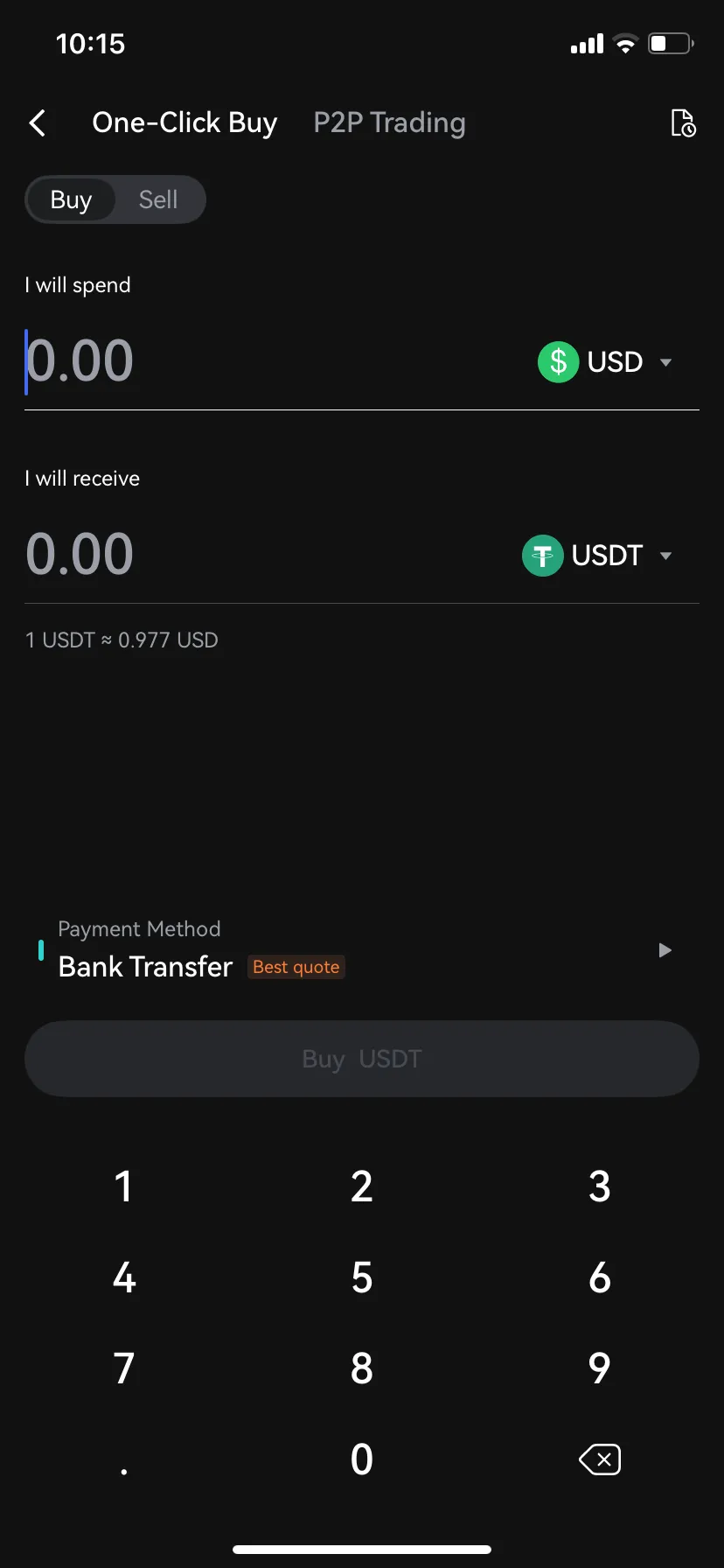
Open the LBank mobile app and tap “Buy Crypto”
2
Select “Buy”
3
Choose , enter the fiat currency you want to use, input the amount, then tap “Buy” or “Confirm”

Desktop guide

1
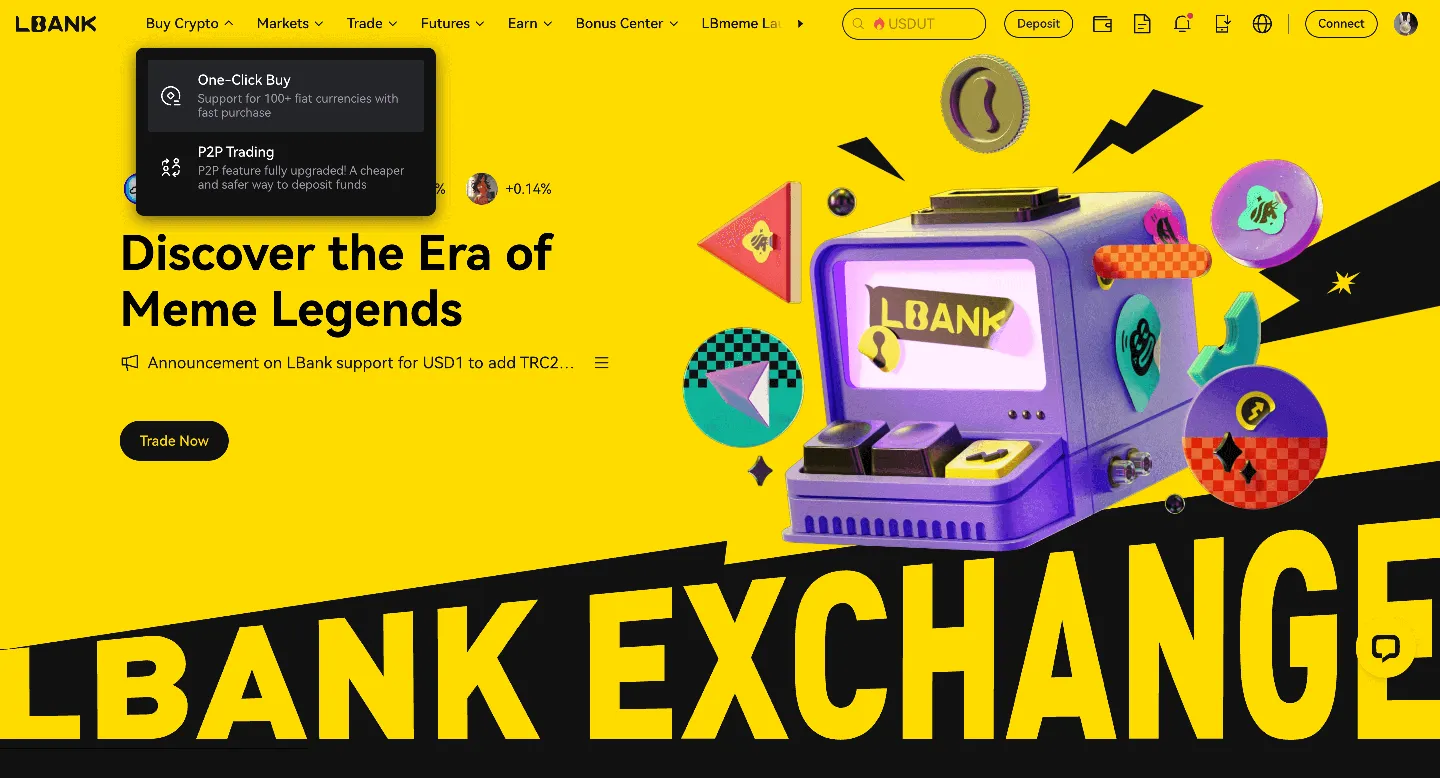
Log in to LBank on your desktop browser and click the “One-Click Buy” option.
2
Under the “One-Click Buy” tab:

(a). Choose the fiat currency you want to use

(b). Select the TensorSpace you want to purchase

(c). Enter an amount or use quick-select options (e.g., 100, 200, 500, max)
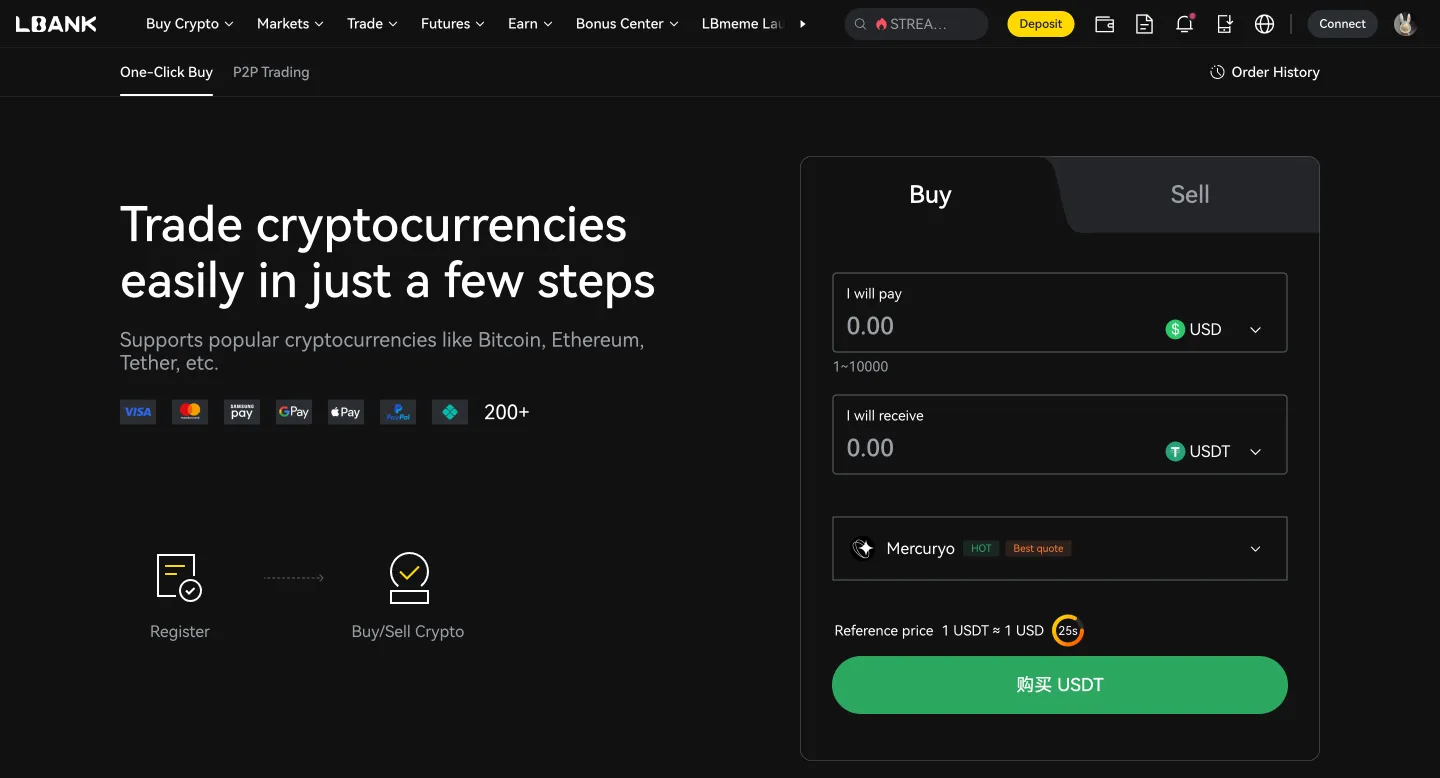
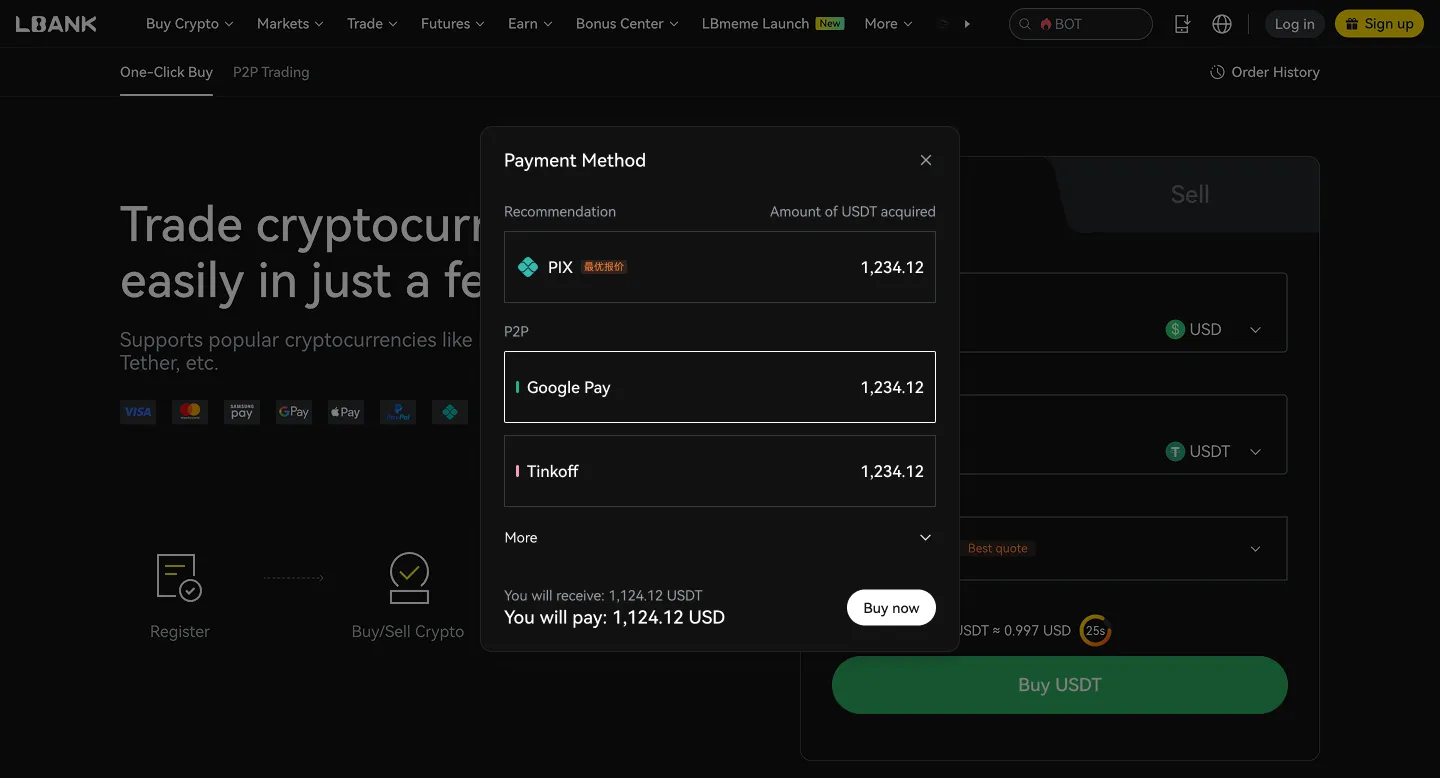
(d). Choose your payment method
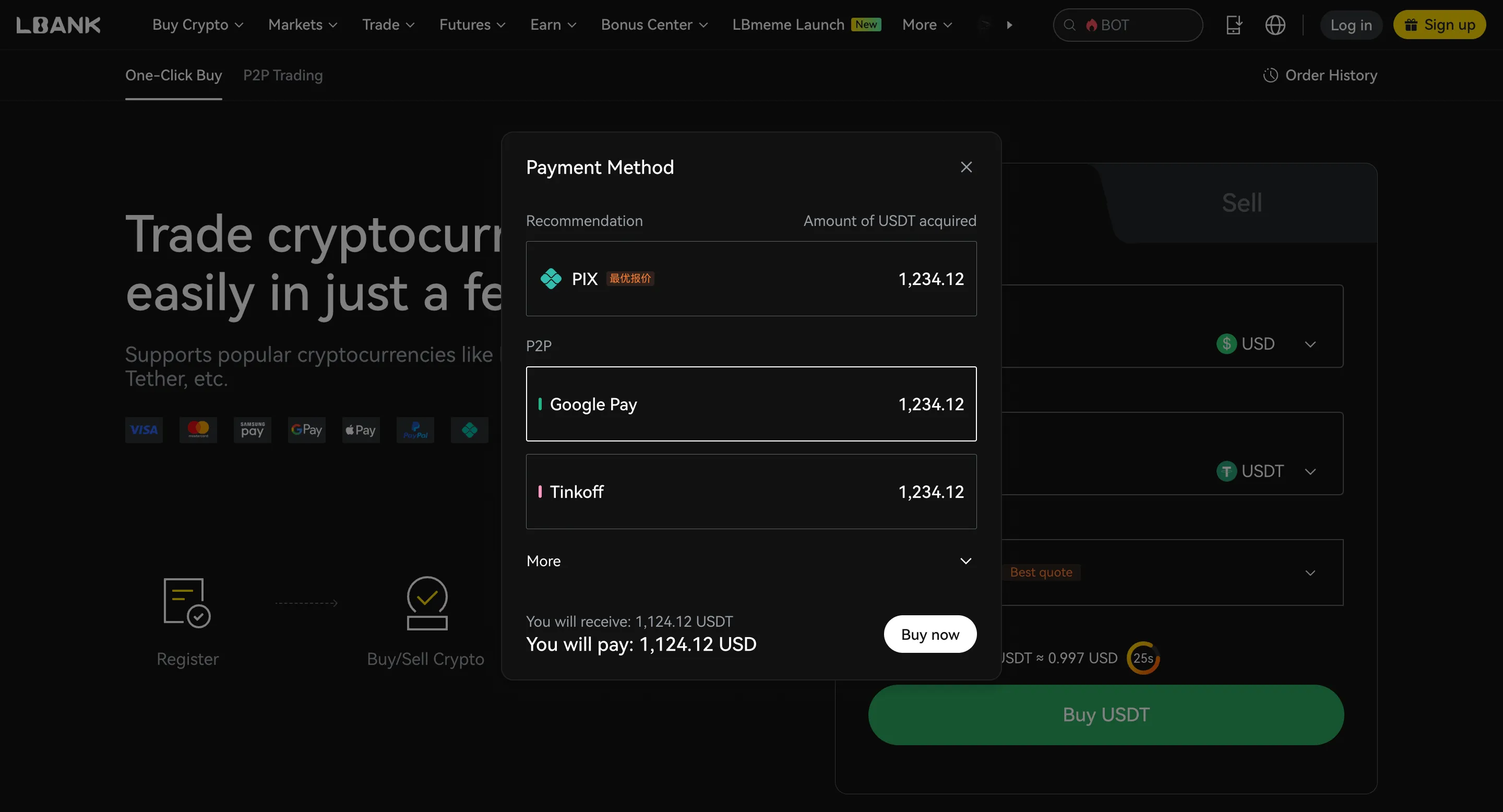
(e). Click “Confirm” or “Buy now”
P2P Trading

Merchant
Price
Amount | Limit
Payment Method
Action
18
180-fast24x7
1199 min | 100%
1.000 USD
10.00 USDT
10.000 - 10.000USD
Bank Transfer
SS
Sswap
174 min | 100%
1.003 USD
3843.91 USDT
50.000 - 3855.000USD
Wing Money
True Money (Cambodia)
Bank Transfer (Cambodia)
ABA (Cambodia)
NI
Nita_Global
332 min | 100%
1.003 USD
1000.00 USDT
50.000 - 1000.000USD
Wing Money
ABA (Cambodia)

What is TensorSpace (TPU)?

TensorSpace (TPU) is a Web3 protocol designed to establish a decentralized platform for artificial intelligence and machine learning (AI/ML) enthusiasts, developers, and researchers. The project leverages the Bittensor network, which is a decentralized machine learning network. The core functionality of TensorSpace involves enabling users to lend and borrow various processing units, including Graphics Processing Units (GPUs), Tensor Processing Units (TPUs), and Language Processing Units (LPUs). These resources are utilized for a range of AI/ML purposes, such as training neural networks, natural language processing, and computer vision. Through a user-friendly interface, TensorSpace allows individuals to build and deploy no-code AI applications on top of Bittensor. This includes the ability to create and fine-tune custom GPT models using personal data, which can then be shared. The project also features a liquidity staking protocol involving $TAO, the native token of Bittensor. Users can stake their $TAO to earn dynamic $TAO, which can then be used to acquire subnet tokens. These subnet tokens grant ownership and governance rights within specialized AI-based applications operating on the Bittensor network. The TPU token itself serves as a derivative for TensorSpace platform shares, designed to allow users to earn directly from the platform. TensorSpace aims to democratize access to AI/ML computing resources, promote innovation within the decentralized machine learning space, and create new avenues for value generation in the AI economy. It is important to note that "TensorSpace" also refers to an open-source, browser-based neural network 3D visualization framework (TensorSpace.js) that helps visualize machine learning models. Additionally, "TPU" (Tensor Processing Unit) is a general term for specialized hardware developed by Google to accelerate AI and machine learning workloads. The crypto project discussed here utilizes 'TPU' as its token ticker. Learn more

Is TensorSpace (TPU) a good investment?

Whether TensorSpace (TPU) is a good investment depends on your personal financial situation and risk tolerance. Cryptocurrency investments are speculative and can be highly volatile.

Before investing in TensorSpace (TPU) or any cryptocurrency, consider the following:

Your financial goals
Are you seeking short-term gains or long-term growth?
Your risk tolerance
Your risk tolerance
How much potential loss are you comfortable with?
Diversification
Diversification
Don’t put all your eggs in one basket. Spread your investments across different types of assets.
Your goals and time horizon
Cryptocurrencies are best suited for long-term investors. Disclaimer: This is not financial advice. Please do thorough research before making any investment decisions.

Fees, limits, and processing time for buying TPU on LBank

Compare fees, transaction limits, and estimated processing times across different payment methods. Actual fees and availability may vary by region, fiat currency, payment method, and third-party providers. Please refer to the order page for final details.


ROI calculator

If I invest, how much profit will I make?
Invest
$
Enter
TPU
Date
2026-05-28
You will earn $-- in profit, with an ROI of --

What can you do with TensorSpace (TPU)?

Investment
Buy and hold TensorSpace (TPU), expecting its value to increase over time.
Investment
Trade
Actively trade TensorSpace (TPU) on LBank to profit from price fluctuations.
Trade
Pay
Use TensorSpace (TPU) to pay for goods and services where accepted.
Pay

Why is LBank the best platform to buy TensorSpace (TPU)?

User-friendly interface
LBank offers a simple and intuitive platform for buying and selling TensorSpace (TPU).
Competitive fees
Competitive fees
LBank provides competitive trading fees for TensorSpace (TPU).
Secure platform
Secure platform
LBank applies robust security measures to protect your funds.
Diverse trading pairs
LBank offers a wide range of trading pairs for TensorSpace (TPU).
24/7 customer support
LBank provides customer support to help you with any questions or issues.
Mobile app
Mobile app
Trade TensorSpace (TPU) anytime, anywhere using the LBank mobile app.
High liquidity
High liquidity
LBank offers excellent liquidity for TensorSpace (TPU) trading, ensuring you can easily buy and sell your crypto assets.
Regulatory compliance
LBank complies with all regulatory requirements in the jurisdictions where it operates to ensure a compliant and secure trading environment

After buying TPU, what is the best way to store it?

After buying TPU, you can choose a storage method based on your usage frequency, holding period, and security needs. If you need to trade at any time, you can store it in your LBank account. If you prioritize self-custody or long-term security, consider using a personal wallet or a hardware wallet.

Store in your LBank account

Store in your LBank account

Suitable for
Users who want to trade or convert at any time
Short-term BTC holders
Features
Ready to use immediately after purchase; easier to use
Ideal for frequent trading, conversions, or using platform features
Security Alert
Please enable 2FA
Please set an anti-phishing code
Only log in through official channels
Transfer to a personal hot wallet

Transfer to a personal hot wallet

Suitable for
Users who want to manage their own assets
Users who need daily transfers or on-chain usage
Features
More flexible; convenient for daily transfers and management
Better suited for small holdings and everyday use
Security Alert
Do not store seed phrases or private keys in the cloud
Do not save sensitive information via chat tools, email, or screenshots
Stay alert for phishing websites and fake wallet apps
Transfer to a hardware wallet

Transfer to a hardware wallet

Suitable for
Long-term BTC holders
High-value holders who prioritize security
Features
Private keys are stored offline, offering enhanced security
Ideal for long-term storage of infrequently moved assets
Security Alert
Securely back up seed phrases offline
Never disclose your recovery phrase to anyone
Assets may be irrecoverable if the seed phrase is lost

TensorSpace (TPU) FAQ

TensorSpace aims to address the challenges of accessibility and decentralization in AI/ML development and resource sharing. It seeks to empower AI/ML enthusiasts, developers, and researchers by providing a robust platform for lending and borrowing crucial computing resources, such as GPUs, TPUs, and LPUs. This facilitates a wide range of AI/ML tasks, including training neural networks, natural language processing, and computer vision, fostering a more distributed and collaborative AI ecosystem.
TensorSpace (TPU) is a specific protocol built upon Bittensor, a decentralized machine learning network. Its core objective is to serve as a dedicated platform for individuals engaged in AI and machine learning, including enthusiasts, developers, and researchers. The project leverages Bittensor's underlying decentralized infrastructure to execute its operations, emphasizing its commitment to a distributed approach for AI/ML resource management and application development.
TensorSpace offers key functionalities designed to advance AI development. It provides a platform for users to lend and borrow essential computing resources like GPUs, TPUs, and LPUs, which are crucial for AI/ML tasks such as neural network training, natural language processing, and computer vision. Additionally, it empowers users to build and deploy no-code AI applications on Bittensor, create custom GPT models, fine-tune them with their data, and share these innovations, thereby democratizing access to advanced AI tools.
The 'TPU' token is TensorSpace's designated ERC-20 token, playing a specific role within its ecosystem. Beyond its direct transferability, TensorSpace incorporates a liquidity staking protocol. This allows users to stake $TAO, which is Bittensor's native token, to earn dynamic $TAO. This earned dynamic $TAO subsequently serves as a utility within the system, specifically enabling the purchase of subnet tokens, indicating its function in facilitating participation or access to Bittensor's subnets through TensorSpace.
TensorSpace distinguishes itself by decentralizing AI/ML resource allocation and development on the Bittensor network. Its unique value proposition lies in enabling users to seamlessly lend and borrow vital computing power, including GPUs and TPUs, without centralized intermediaries. This peer-to-peer resource sharing, combined with capabilities for no-code AI application deployment, custom GPT model creation, fine-tuning, and sharing, establishes a comprehensive and accessible platform aimed at democratizing sophisticated AI development within a Web3 framework.
It is important to clarify that TensorSpace (TPU) refers specifically to the crypto project, which functions as a protocol built on Bittensor to facilitate decentralized AI/ML development and resource sharing. This entity is entirely separate from TensorSpace.js. TensorSpace.js is a distinct and unrelated neural network 3D visualization framework, serving a different technical purpose and not involved in the decentralized finance or AI computing resource management space that the TensorSpace (TPU) crypto project occupies.

How to buy other crypto assets